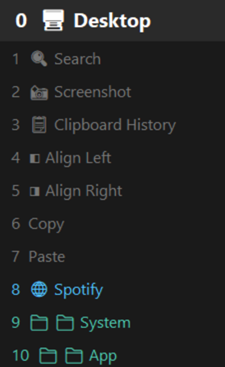
Hold right-click and scroll to move through tasks faster. Tasks can be anything: apps, shortcuts, links, screenshots, and everyday Windows actions.
๐ก Windows may show a SmartScreen prompt on first run โ click More info โ Run anyway. This is normal for indie apps without a paid code-signing certificate. Why?
The actions you do 20 times a day โ switching apps, taking screenshots, snapping windows โ are now one gesture away.
No more reaching for the keyboard. Stay in flow and execute anything right from where your hand already is.
Launch apps, snap windows, browse bookmarks, and run Windows actions โ all without touching the keyboard.
How it works
RightWheel lives in your system tray and activates with a simple mouse combo โ no keyboard required.
Press and hold your right mouse button anywhere on the screen.
Scroll the wheel upward while holding right-click โ the shortcut panel appears instantly.
Select an app, shortcut, URL, or folder from your wheel โ it executes immediately.
Use cases
Add any action to your wheel. Configure it once, use it hundreds of times a day.
Minimize all windows and get to your desktop without hunting for the tiny corner button.
Open the snipping tool in one gesture to capture exactly what you need, right when you need it.
Add any .exe to your wheel and open Chrome, VS Code, Slack, or any app in one click โ no Start menu.
Instantly snap any window to the left or right half of your screen for side-by-side multitasking.
Pull up your full clipboard history and paste anything you've copied recently โ no memorization needed.
Photoshop gets design shortcuts. VS Code gets dev tools. RightWheel switches your wheel automatically.
Features
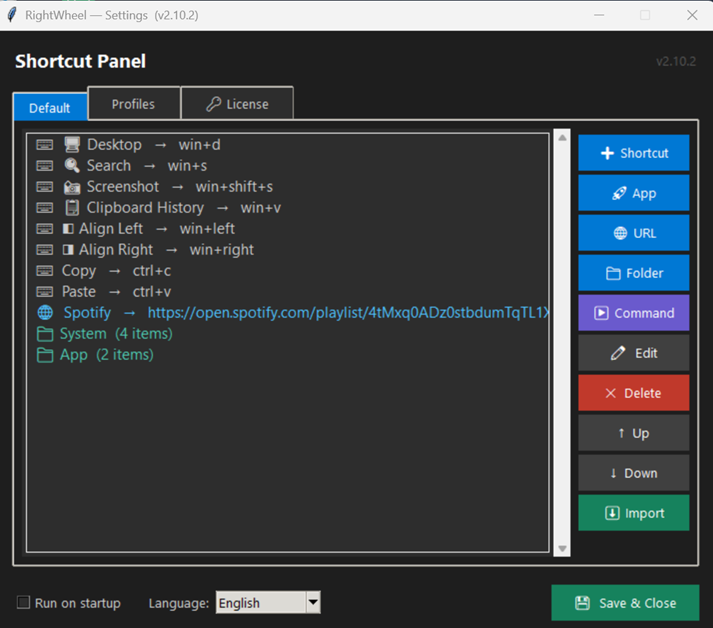
Build your perfect shortcut panel with all the action types you need โ and organize them into folders.
Pricing
Buy once. Use forever. No subscription, no paywalls, no surprises.
๐ก Windows SmartScreen may appear on first run โ click More info โ Run anyway. Learn why
FAQ
Every shortcut. Every app. Every website.
All at your right-click.